Eagle-Eye
The anti-financial crime platform for financial institutions. Five steps, from onboarding to examination, on one platform, each handing its evidence to the next. Scroll through them, or jump to any step from the bar.
Screening that does not stop at onboarding
SHADOZ is CDC's own screening engine. It matches names in their native script first, then across scripts, on four lanes.
Individuals, and the owners, UBOs, signatories and executives of corporates as individuals.
Answered in milliseconds
Each transaction is screened by service type and risk level, and so is every party to it: sender, beneficiary, UBOs, sending bank and correspondent bank. Teller, transfer and cross-border flows each get the right lists and thresholds.
Marked screened only when every party is, with load governed against surges
After each list update, only the existing customers the change touches.
New listings are checked against your book without a full re-run
Up to three name aliases in one request, with identifiers.
Optional zero-footprint mode: screen without retaining the subject's data
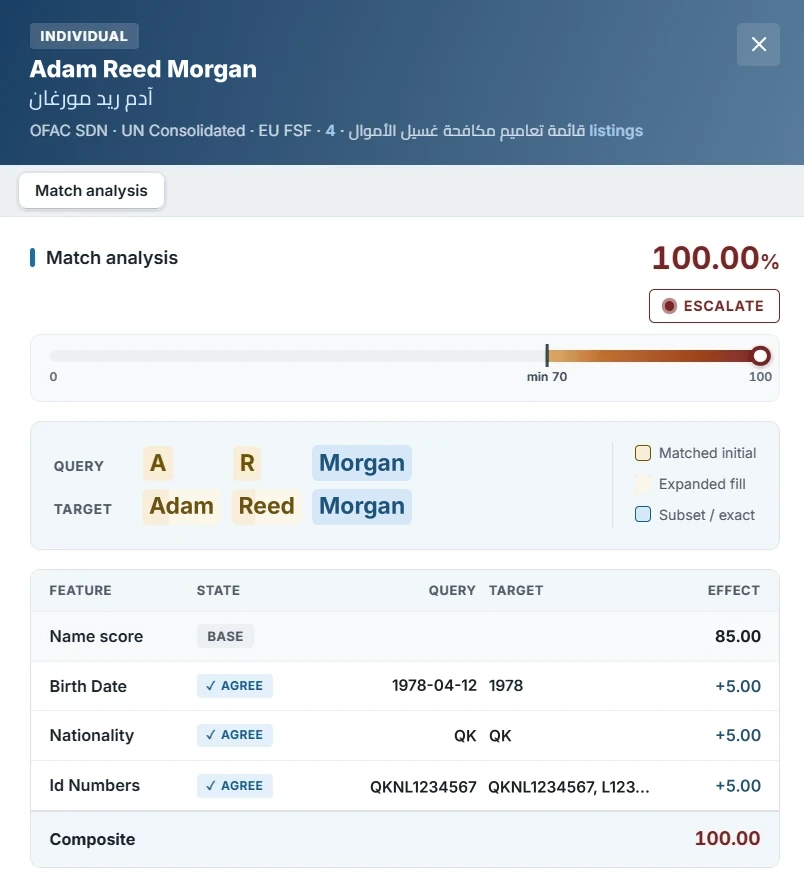
Every match shows its reasoning
- Name scoreHow closely the names match, scored in each script
- Name alignmentInitials and expanded names aligned token by token
- Composite scoreName score confirmed or demoted by configurable identifiers
- WhitelistWhitelist suppressions are shown on the hit too
Lists screened
Templates per channel
Lists, minimum scores and identifier rules per channel: the dial for alert volume, changed without a release.
Beyond names
- Crypto walletsWallet addresses are screened against sanctions lists.
- JurisdictionsThe countries linked to a customer or a payment are screened against the jurisdiction lists you set.
A risk rating you can defend line by line
Every customer carries a rating built from who they are and how they transact, re-scored as behaviour changes, and explained factor by factor.
How the rating is built, in order
- 01 Dynamic risk formulaWho the customer is and how they transact, weighted per customer type and re-scored as behaviour changes
- 02 Scenario feedbackMatches against your detection scenarios feed back into the score
- 03 Automatic overridesRules you define override the calculated rating when their conditions are met
- 04 Manual risk controlsOfficers can raise a customer's classification, never lower it
Your tiers
Tier names, number and cut-offs are yours to set. Colour, meter and word always appear together, so nothing relies on colour alone.
Examples of common factors and their weights.
Your typologies, live in milliseconds
AML/CFT and fraud scenarios on one engine: onboarding validation, profiling, behavioural monitoring and transactional analysis, calibrated to your risk tolerance.
Rules your compliance team writes, and anyone can read
Rules and thresholds are fully customisable, each scenario reads back as a plain-language statement, and new typologies go live without a software release. Change the values in the example to see the read-back update.
Alert when a customer pays one beneficiary or more times within ±% of each other in days.
Alert when a high-risk customer makes more than 3 transfers, each over JOD 1,000, within one month and from more than one branch.
An example of the read-back, not a screen capture.
Scenarios that watch for what does not fit
Across sectors
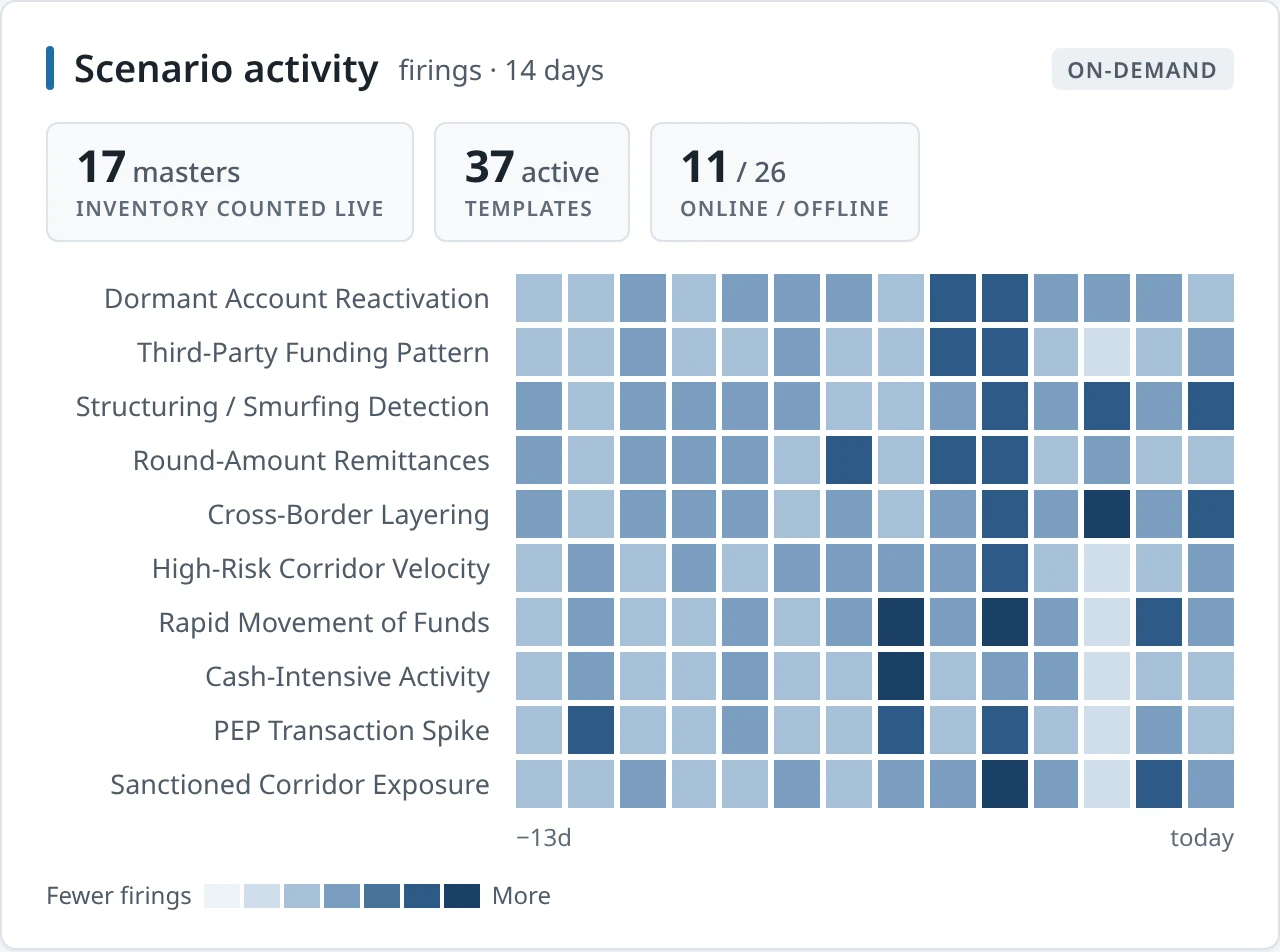
- Dormant account reactivation
- Third-party funding pattern
- Structuring and smurfing detection
- Rapid movement of funds
- Cash-intensive activity
- PEP transaction spike
Exchange and remittance
- Round-amount remittances
- Cross-border layering
- High-risk corridor velocity
- Sanctioned corridor exposure
Insurance
- Early policy surrender or cancellation
- Premium overpayment and refund requests
- Frequent beneficiary changes
- Large single or cash premium
Microfinance
- Early or lump-sum loan repayment
- Repayments by unrelated third parties
- Linked borrowers across loans
- Loan use inconsistent with stated purpose
Any scenario, for any sectorThe engine is dynamic and rule-based: which fields a scenario uses is a matter of configuration, never development.
Process controls and alert workflows
Stages, roles and dispositions are set to match how your team already works, and every alert reaches the right person with the full case context.
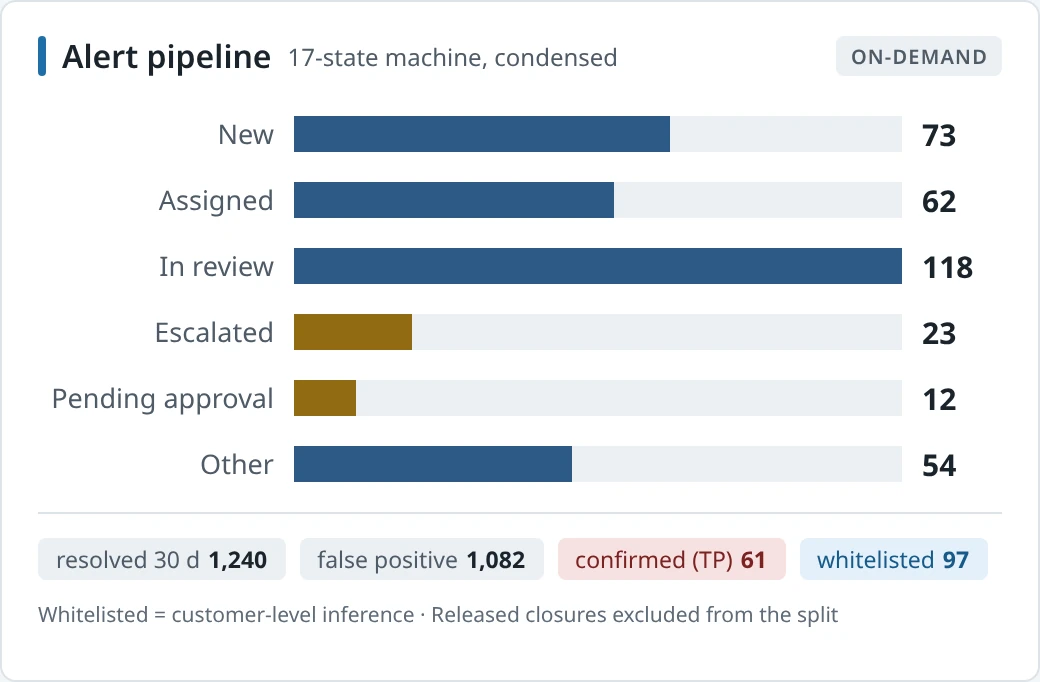
Every open alert, by state
A 17-state machine, condensed for the CCO: what is new, in review, escalated or pending approval, with 30-day outcomes.
Process control, enforced by the system
Any decision can require a second pair of eyes, and an optional third level of approval. The machine explains; your compliance team decides.
When the inspector or auditor asks, the answer is already on record
Every screening result, risk score and decision is recorded when it happens, with who made it and why, so evidence for an inspection or audit is never rebuilt after the fact.
Explainable
Every decision shows its reasoning
Traceable
Every action carries who, when and why
Verifiable
Every result can be evidenced afterwards
Oversight and safeguards
Command Center
Your network on one page: where risk sits, what is waiting, and whether the controls are working.
Explore the Command CenterSecurity, Integration and Deployment
On premises, in your private cloud or with dedicated hosting, connected to your systems over APIs and file-based data transfer, with permission-based access and a complete audit trail.
Your data stays where your regulator says it mustConfigured by your team, not a vendor release
See Eagle-Eye on your own data
Three steps, at your pace. Your data stays yours throughout.
- A guided walkthrough of the platform with your compliance team
- A benchmark screening run on an extract of your customer book
- A scoping session for integration with your core systems